 Best Lovegobuy Spreadsheet
Lovegobuy Spreadsheet
The six fields a find must carry
Each field below is named the way the operator names it. Under each one: where it appears, what happens when it is left at the default, and which cost line or deadline it moves.
Keyword or category. Six fields decide whether what you find can be ordered.
Method
How to judge a listing against the six fields
Open the find, then read down the right-hand column of the product page in the order the operator prints it: translated title, price, purchasing-window note, the two route lines, then the choices. If any of the six is missing or ambiguous, the find is not ready, however good the photograph is.
This is a one-minute check, and it is cheapest at the top of the funnel. Five candidates in a category become one orderable find faster this way than by comparing prices first.

Field one
Shop, read off the route line
The product page prints a two-line route: the seller to the warehouse, then the warehouse to your address. The first line carries a real number at order time, 5.00 CNY on the archived 2024-09 product page on the archived frame, and that fee belongs to the shop. Two finds from two shops pay it twice.
The operator also warns that an outstanding balance can be requested after submission when the seller's price or the domestic delivery fee changes. The shop, not the operator, is the moving part.

Field two
sort by color, the variant that actually ships
Chinese listings carry variants under one link, and the swatch list is often longer than the photo set. On the archived frame the swatches are numbered 1588, 1688 and 1788, which are model codes rather than colours, so a buyer choosing by picture alone is guessing.
The inspection team checks colour against what you selected, not against the photograph you liked. Picking the wrong swatch produces a parcel that passes inspection and still disappoints.

Field three
size, the only measurement inspection can use
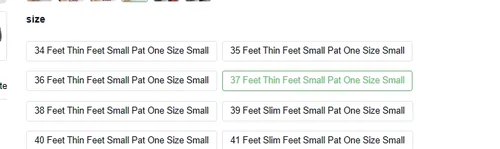
The size buttons on the archived frame read as sentences, not numbers: 34 Feet Thin Feet Small Pat One Size Small, 37 Feet Thin Feet Small Pat, 41 Feet Slim Feet Small Pat One Size Small. They are the shop's own wording, translated literally.
Inspection compares the item against appearance, colour, large-area damage, stains, size, model and version number, with apparel checked against your remark or the label size. If you did not state a size, there is nothing to compare against and a size complaint has no footing.
Field four
Quantity, read against Inventory
The stepper sits next to a live stock figure the operator prints as Inventory :. On the archived frame it reads 200. A quantity above that number does not fail at checkout; it fails later, as a partial purchase or a request for a different variant.
Quantity also changes parcel geometry. any item with a side of 90 cm or more is tagged individually packaged and must ship alone, and the operator notes that parcels over 10 kg or with many identical items are more likely to be stopped.

Field five
Leave a Message, the only channel to the shop
This free-text box is the single place where an instruction reaches the seller. The archived order carries the message not want the box pls, and the same string reappears on the order card as Product Notes, which is how you confirm the instruction survived the handover.
Keep it to one instruction in plain words. The seller reads it through machine translation, and a paragraph of conditions arrives as noise.

Field six
Declared value, chosen after you have paid
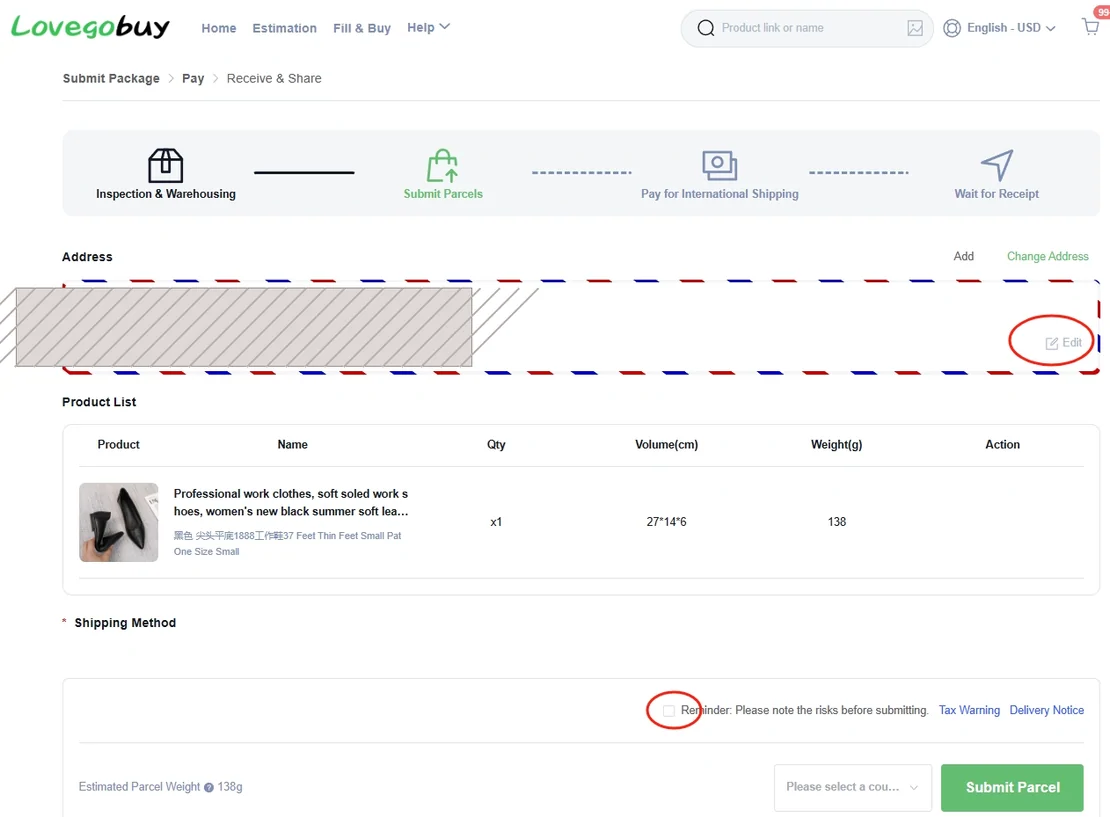
Declaration happens at parcel submission, not at purchase. The operator offers two modes: Personalized Declare, where the system drafts the declaration from the product attributes and you may edit type, quantity, unit price and total; and System Declare, where you enter only a total.
The operator publishes reference tariff thresholds for guidance: US 800 USD, Canada 20 CAD, UK 0 GBP, Australia 1000 AUD, EU 0 EUR, Japan 130 USD, Singapore 300 USD, New Zealand 300 USD, Switzerland 100 CHF, reference thresholds published by the operator, article created 2024-07-29, read 2026-10-10. It also warns that a declaration whose price, weight or value does not match the goods may affect clearance. This is the one field on the list where a careless entry costs more than the item.
Taking a ready find to the agent
When all six fields are set, the next screen is the operator's. Registration asks for an email address, a username and a password.
Facts on this page last read 2026-10-11. Links to the agent carry a referral parameter; see how this site is paid.